Tutorial — LeRobot Export
This is the shortest end-to-end data path in the repo: record one run, export it, inspect the result. No hardware, no training, no checkpoint compatibility issues.
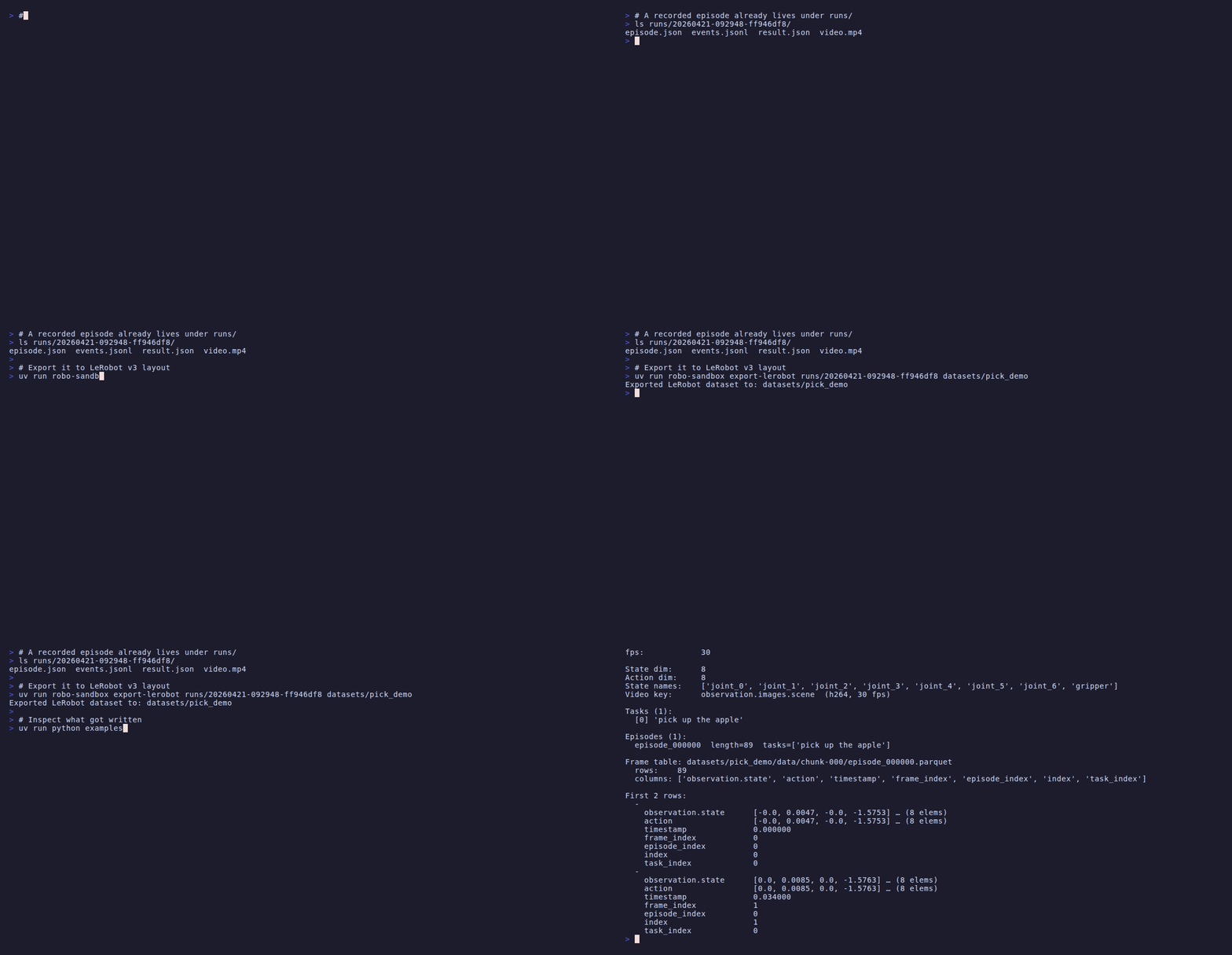
Watch the longer walkthrough
If you are evaluating the project as a data source, this is the page to start with. It shows that a normal recorded run can be turned into a plain LeRobot v3 dataset and read back with standard tools.
The three commands
# 1. Record one pick episode (sim-first, zero hardware)
uv run python examples/record_demo.py --out-dir runs

# 2. Export it to LeRobot v3 layout
RUN=$(ls -1t runs/ | head -1)
uv run robo-sandbox export-lerobot runs/$RUN datasets/pick_demo

# 3. Inspect what got written
uv run python examples/inspect_lerobot_dataset.py datasets/pick_demo
That is the whole loop.
What gets written
datasets/pick_demo/
├── meta/
│   ├── info.json              # codebase version, features, fps, splits
│   ├── tasks.jsonl            # one line per task (task_index → text)
│   └── episodes.jsonl         # one line per episode (index, tasks, length)
├── data/
│   └── chunk-000/
│       └── episode_000000.parquet   # per-frame state + action + timestamps
└── videos/
    └── chunk-000/
        └── observation.images.scene/
            └── episode_000000.mp4   # reference-only; parquet points at this
The structure is simple: metadata, one parquet chunk, and the video reference alongside it.
The frame table (.parquet)
The parquet file has one row per sim tick:
| column | type | shape | meaning |
|---|---|---|---|
observation.state |
float32 | [state_dim] |
concat(robot_joints, [gripper_width]) |
action |
float32 | [state_dim] |
recorded action vector, or observation.state as fallback for scripted demos |
timestamp |
float32 | [1] |
seconds since episode start |
frame_index |
int64 | [1] |
zero-based per episode |
episode_index |
int64 | [1] |
always 0 for single-episode exports |
index |
int64 | [1] |
global row index (same as frame_index for 1-episode sets) |
task_index |
int64 | [1] |
links each frame to a task in tasks.jsonl |
state_dim = arm DoF + 1 for the gripper width. For the bundled
Franka that's 7 + 1 = 8; for the built-in 6-DOF arm that's 6 + 1 = 7.
Action fallback: scripted episodes often do not have a real
per-frame action field in events.jsonl. In that case the exporter
uses observation.state as a fallback so downstream code never sees a
null. Teleoperated runs keep their recorded action vector.
The video reference (.mp4)
observation.images.scene is stored as a video reference — the
parquet has no image bytes. LeRobot's VideoFrame feature type picks
up the matching .mp4 by convention. H.264, 30 fps, same pixel
dimensions as whatever MuJoCoBackend.render_size was set to during
recording.
The metadata (info.json)
{
  "codebase_version": "v3.0",
  "robot_type": "unknown",
  "total_episodes": 1,
  "total_frames": 89,
  "fps": 30,
  "splits": {"train": "0:89"},
  "features": {
    "observation.state": {"dtype": "float32", "shape": [8],
      "names": ["joint_0", "joint_1", "joint_2", ..., "joint_6", "gripper"]},
    "action":            {"dtype": "float32", "shape": [8], "names": [...]},
    "observation.images.scene": {"dtype": "video", "shape": [0, 0, 3],
      "video_info": {"video.fps": 30.0, "video.codec": "h264"}},
    ...
  }
}
robot_type is not auto-filled. If you publish the dataset somewhere,
that is the field you should set yourself.
Inspecting the result
examples/inspect_lerobot_dataset.py reads the metadata files + first
parquet chunk and prints a one-page summary. Sample:
Dataset:        datasets/pick_demo
LeRobot:        v3.0
Episodes:       1
Total frames:   89
fps:            30

State dim:      8
Action dim:     8
State names:    ['joint_0', ..., 'joint_6', 'gripper']
Video key:      observation.images.scene  (h264, 30 fps)

Tasks (1):
  [0] 'pick up the apple'

Episodes (1):
  episode_000000  length=89  tasks=['pick up the apple']

Frame table: datasets/pick_demo/data/chunk-000/episode_000000.parquet
  rows:    89
  columns: ['observation.state', 'action', 'timestamp', 'frame_index', ...]
If anything looks off here, this is usually the cheapest place to catch
it. Wrong state dimension, suspicious frame count, or action ==
state everywhere are all easier to debug now than later in training.
Loading it with vanilla tools
You do not need any RoboSandbox imports to read the dataset back:
import pyarrow.parquet as pq

table = pq.read_table("datasets/pick_demo/data/chunk-000/episode_000000.parquet")
print(table.column_names)          # ['observation.state', 'action', ...]
print(table.num_rows)              # 89
first_state = table["observation.state"][0].as_py()  # list[float] of length 8
Or with HuggingFace datasets:
from datasets import Dataset
ds = Dataset.from_parquet("datasets/pick_demo/data/chunk-000/episode_000000.parquet")
ds[0]   # dict with observation.state, action, timestamp, ...
Requirements
From a repo checkout:
The [lerobot] extra brings in pyarrow >= 15. The export path itself
is just parquet, json, and mp4.
Where this fits
This is the first step in the broader policy workflow:
- LeRobot Export (you are here) — proves the data path.
- LeRobot Policy Replay — drives a
public ACT checkpoint through
run_policyunder cross-embodiment mismatch. - Sim-to-Real Handoff — the deployment recipe and SO-101 backend skeleton.
You can stop after this page if all you care about is the dataset path. The other tutorials build on it, but they are not prerequisites for using export.
Troubleshooting
| Symptom | Likely cause |
|---|---|
pyarrow not found on export |
uv pip install -e 'packages/robosandbox-core[lerobot]' |
events.jsonl not found |
The source run directory isn't from LocalRecorder; check it has all four expected files |
state_dim = 7 instead of 8 |
Using the 6-DOF built-in arm. Bundled Franka gives 8. |
| Action vector identical to state | Scripted episode (no teleop); fallback behavior — teleop runs record real actions |
| Video looks dark / cropped | MuJoCoBackend.render_size at record time was too small; re-record at 480×640+ |